

When HubSpot calls, you answer. But this isn’t a story about that phone call, or the electric All-Hands that followed. This is a story about what HubSpot Ventures’ strategic investment in Tango means for Revenue Operations and everyone they enable. ⚡
HubSpot brings your whole front office onto one customer platform, with:
- A Smart CRM out-of-the-box that connects your data, teams, and customers
- Powerful engagement hubs across marketing, sales, and service
- Countless opportunities to customize HubSpot to match your team’s processes as you grow
If your company has considered switching its CRM or adding other tools to its go-to-market stack, you've probably encountered:
- Apprehension about investing time to train employees on a new software
- Some pressure from leadership to get the most out of your investment
- Some marketers, sales reps, and customer success managers who will resist change every step of the way (no matter how intuitive the software or how elegant your process)
HubSpot is known for being easy, fast, and unified. Their customer platform has a wide array of use cases across go-to-market teams, and is customizable so businesses can tailor to their needs. That’s where Tango comes in. 💃🏽
Tango is the easiest, fastest way to create documentation and drive HubSpot adoption with minimal change for end users. If you want to maximize HubSpot's full potential and decrease the amount of time spent on user support, Tango can help. It's the easiest, fastest way to create documentation and drive HubSpot adoption.
HubSpot adoption insights you won’t find anywhere else
Let’s look at some data. Over 2,300 companies already use Tango to enable their employees to make the most of HubSpot. In the last two years alone, they’ve captured tens of thousands of HubSpot workflows to create interactive walkthroughs with hundreds of thousands of steps.
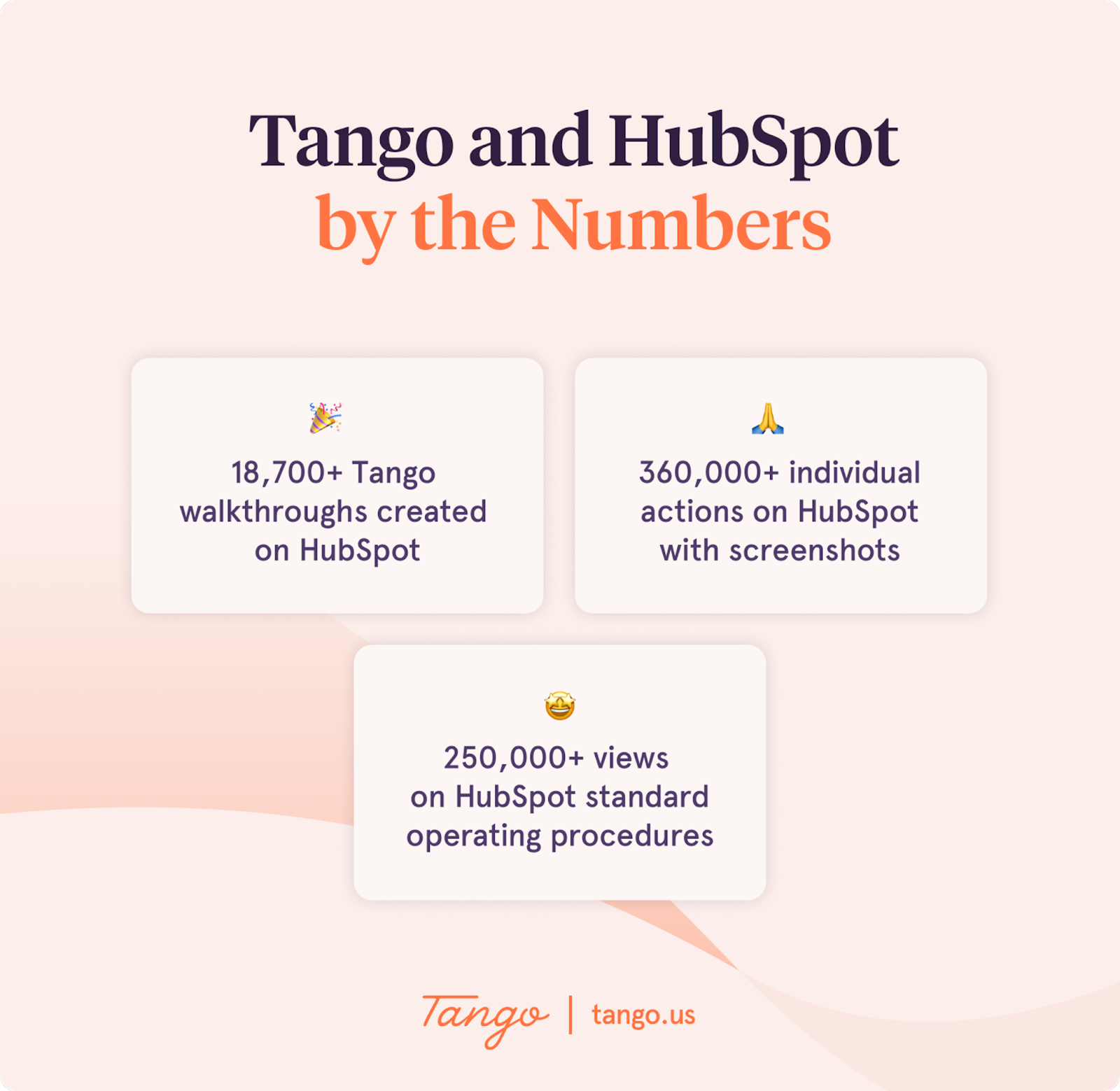
Suffice it to say Tango customers know how to roll out HubSpot—and have learned a thing or two about setting end users up for ongoing success.
To be clear: HubSpot is known for bringing ease-of-use into enterprise customer relationship management, and rightfully so. (Check out HubSpot AI, if you haven't already!) But even on a remarkably user-friendly platform, internal processes can get confusing fast:
- Execution → The average HubSpot walkthrough on Tango has 16 steps. Tango makes execution faster.
- Volume → To do their jobs, Marketing, Sales, and Customer Success perform countless standard operating procedures (SOPs) in HubSpot every day.
- Breadth → There are more tools for go-to-market teams than ever, and work happens inside and outside of your CRM.
- Nuance → Processes that seem the same on the surface often aren’t, underneath. Setting up multi-touch attribution reporting for a Priority 1 marketing campaign isn’t the same as a Priority 3. Entering a new lead looks different for enterprise, mid-market, and small business sales reps. Pulling data for a quarterly business review for a big account debating renewal is more intensive than preparing for a pulse check with a new customer.
Aligning the people, processes, systems, and data throughout the customer journey is a big job, and your CRM is at the center of it. If a CRM runs your business, it’s tough to overstate the benefits of taking an employee-first approach to training and enablement.
Conventional CRM software training traps to avoid
First, to set the stage: Your CRM will only be as valuable as the data inside it.
If Marketing, Sales, and Customer Success are repeatedly executing processes incorrectly and making manual data entry mistakes, you’re not exactly going to be getting gold in and gold out.
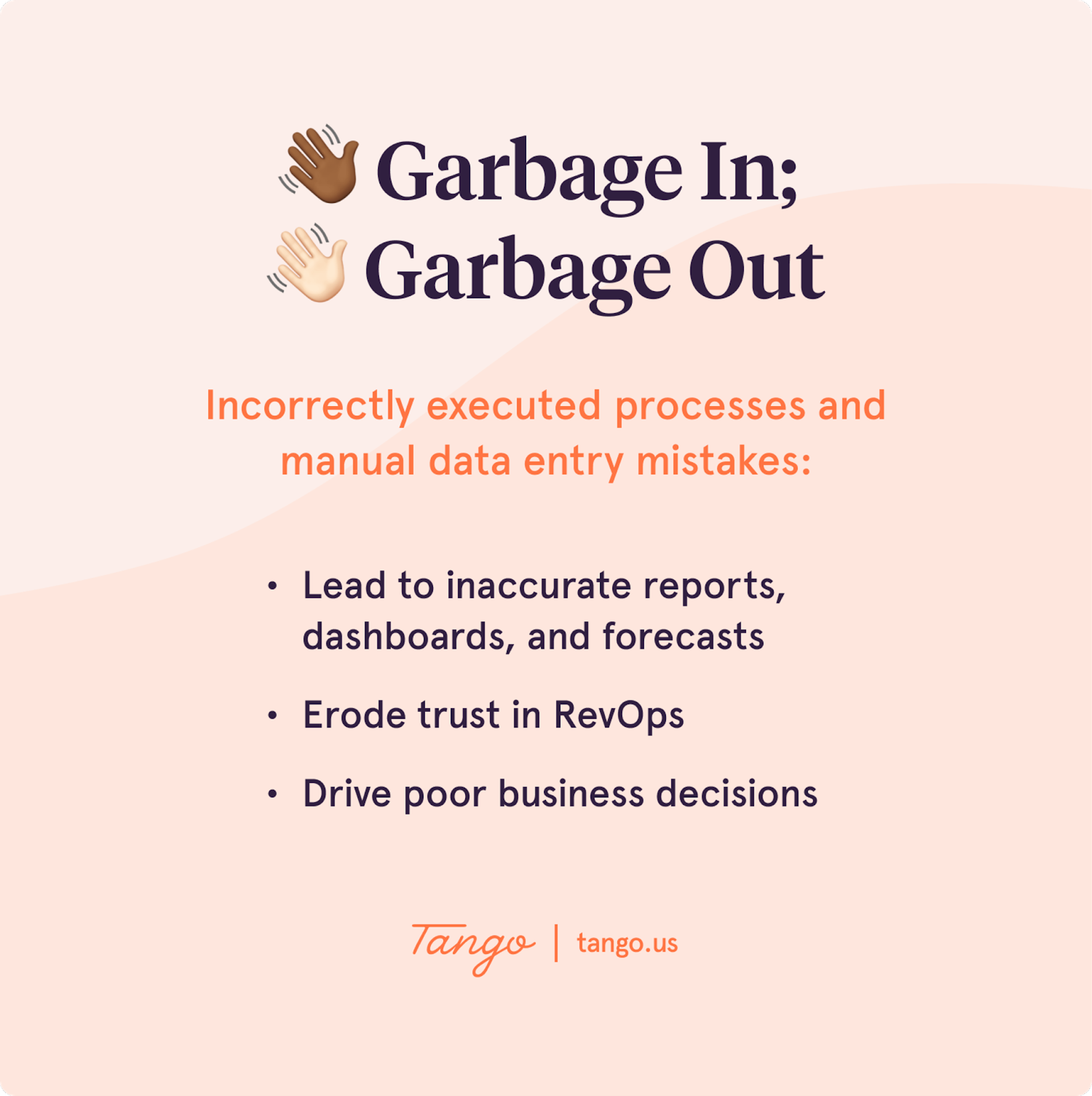
Using Tango will ensure greater return on your HubSpot investment.
Four signs you haven’t cracked the code on software training
If your status quo isn’t exactly the epitome of operational excellence, you may be noticing one or all of the following:
- Marketing, Sales, and Customer Success teams are drowning in tools and struggling to memorize a million SOPs (instead of developing customer, product, and sales expertise)
- You’re doubling as a CRM support rep and reacting to repetitive questions all day (instead of building, maintaining, and optimizing your go-to-market tech stack)
- Your customers are complaining and/or churning (instead of telling everyone they know how much they love your product or service)
- Executives are cross-examining every custom dashboard, report, and forecast (instead of leveraging trustworthy data for better decision making)
Want to turn the ship around?
Yes—you need to knock business process design out of the park. Yes—you need to architect systems that’ll stay in lockstep as your business grows. But you may also need to take a more user-friendly approach to training and re-examine assumptions about the people you want to enable.
Easily misunderstood aspects of end user behavior
Equipping end users to thrive in your unique HubSpot instance is where it either all comes together or all falls apart.
Here’s the thing. You’re training humans, so human psychology matters. Most humans don’t love change—and some are especially resistant. Instructional designer Brittany Arbuckle calls them “ambivalent adopters.” Read: anyone with doubtful, contradictory, or fearful feelings about new technology and processes. Aka…a lot of your end users. 🫠
It’s hard to think of an internal software training project that requires more change enablement (or adaptivity) than a CRM rollout. To dial up your empathy for ambivalent adopters, consider:
| What they’re doing 🔍 | How they’re feeling 💭 |
|---|---|
| Ignoring your outreach | Afraid → And hoping they can stay in their comfort zone a little longer, even if it makes them look bad or lazy |
| Refusing to adopt new processes | Inept → And hoping to increase the odds of getting help directly from an expert when they need it, without looking stupid |
| Tuning out your documentation | Frustrated → And hoping others will see that bringing in revenue, building great products, and delighting customers is more important than memorizing software SOPs |
Ambivalent adopters don’t have a questionable work ethic or hidden desire to make your job harder. They care deeply about their work and your company. They just aren’t interested in learning yet another new tool—especially without someone there to hold their hand and help them get back to what they’re passionate about.
Six ways traditional software training falls down
If you want your ambivalent adopters to tune out your CRM enablement completely, ask them to get up to speed on HubSpot when it’s convenient for you, not them.
When you create training on your timetable and terms, end users have to:
- Memorize dozens of procedures
- Sit through mandatory sessions with information they can’t use in the moment
- Search through various learning tools when they get stuck
- Read wordy documentation and watch long videos to find answers
- Keep up with constant changes across your tech stack
- Forfeit mental energy that could have been saved for more meaningful work
💡 Tango Tip
Think people have the patience for step-by-step software procedure videos? Research shows people think they’re boring, take too much time to watch, and don’t help them skip straight to the step where they’re stuck.
TL;DR → Traditional software training methods aren’t employee-friendly. And the tools you have to right that wrong may not be designed for the job.
Today’s training and enablement tech stack
ICYMI: The modern training and enablement tech stack is changing.
While it may be tempting to lean on your Learning Management System and Knowledge Base to help people understand how you’ve operationalized HubSpot, both tools were built to increase general knowledge (about your market, customer, company, product, or service)—not software knowledge.
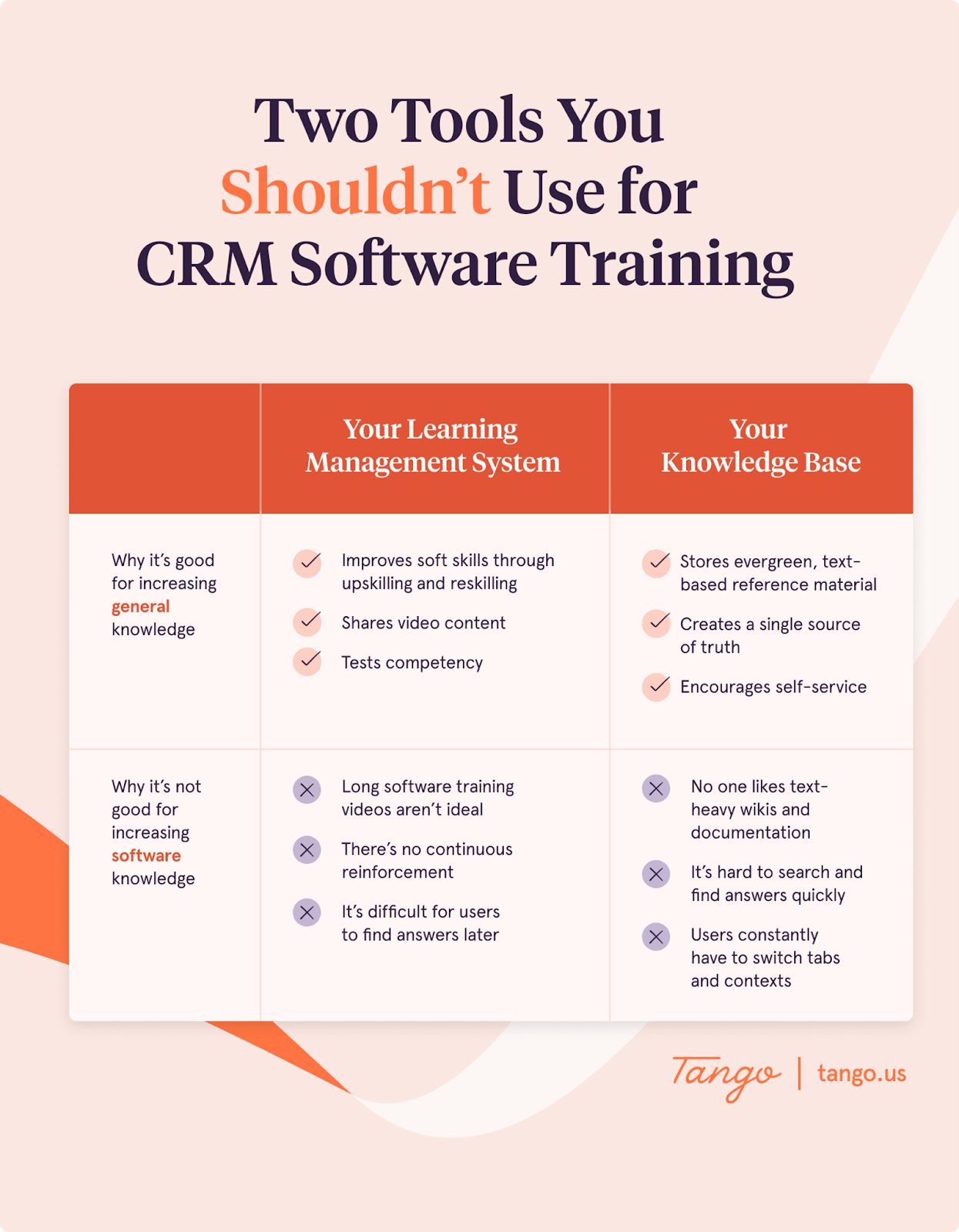
Beginning to feel like there’s a hole in your training and enablement tech stack?
Don’t worry—there’s a way to simultaneously 1) fill that gap, and 2) encourage adoption among even your most change-resistant users.
Real-Time Enablement and digital adoption that’s (actually) easy to adopt
Real-Time Enablement (RTE) is a more modern, employee-first software training strategy.
It works in stark opposition to traditional software training and assumes:
- Some types of knowledge carry more weight than others
- No one should spend mental energy memorizing software processes when they could be getting better at providing real value to the business
- When end users get stuck, they prefer the CliffNotes to the novel
- People want to learn software while they’re using it (with embedded, on-screen guidance)
Wondering how you can help your end users learn how to use HubSpot, while they’re using HubSpot?
You need a Digital Adoption Platform (DAP). Or the only learning tool purpose-built for software rollouts and training.
💡 Tango Tip
Not all DAPs are created equal. While traditional DAPs excel at helping end users learn new software, process experts often find they’re:
- Clunky to operate
- Difficult to integrate
- Complex to deploy
- Expensive to buy
Tango’s Software Knowledge Layer
Tango’s Software Knowledge Layer is a new kind of Digital Adoption Platform.
HubSpot users love Tango because it:
- Is easy to adopt for Revenue Operations teams
- Brings new HubSpot knowledge and expertise to end users’ fingertips
- Drives higher process adoption, faster
With Tango, you can create walkthroughs as you click and teach everyone to just follow the orange box [right on their screen]. Since seeing is believing, check out the clip below.👇🏽
Why Tango
Still not convinced Tango is the ideal DAP to enable end users to use HubSpot perfectly every time (and to its greatest potential)?
Check out five ways Tango increases HubSpot adoption below. 👇
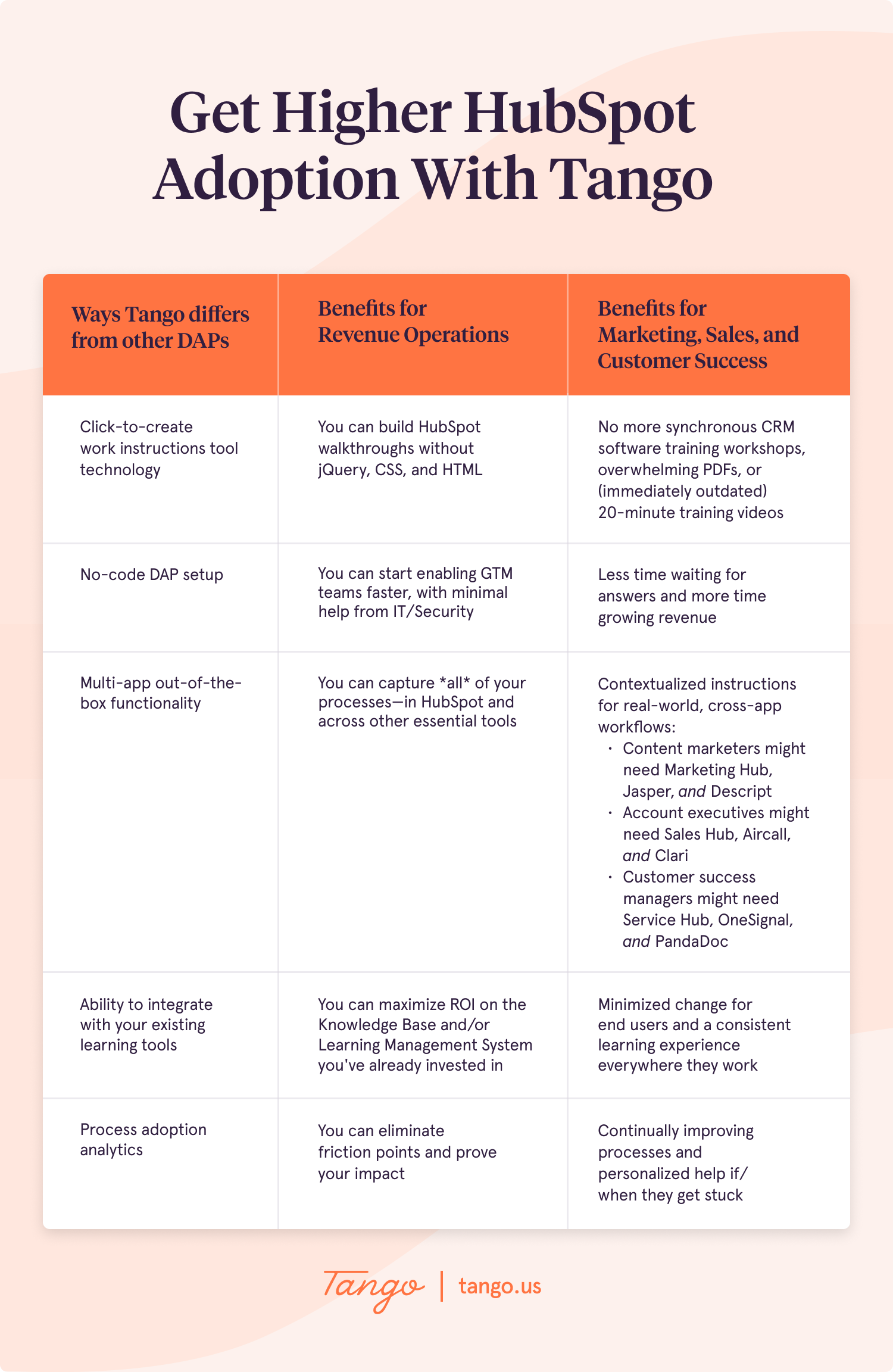
With Tango, you can:
- Throw out the old way of software training that puts your needs above your end users’
- Empathize with change-averse ambivalent adopters and help them evolve at their own pace
- Embed custom how-tos directly inside of HubSpot, where your GTM teams already work
- Increase self-service by making your SOPs simple enough to follow on autopilot
- Reduce training and support costs
- Decrease costly mistakes, improve CRM hygiene, and accelerate new hire time-to-ramp
How SCW uses Tango to teach sales reps HubSpot in a third of the time
Let’s hear from a sales enablement leader who uses Tango’s Software Knowledge Layer to show incoming Business Development Representatives (BDRs) the ropes on HubSpot.
Tom Reddington is a HubSpot power user who manages the sales enablement and BDR team at SCW, a commercial security system company in North Carolina. Tom’s job includes overseeing new hire onboarding for remote sales reps—and leveraging Tango’s on-screen guidance functionality to ensure BDRs are effectively learning critical processes in HubSpot.
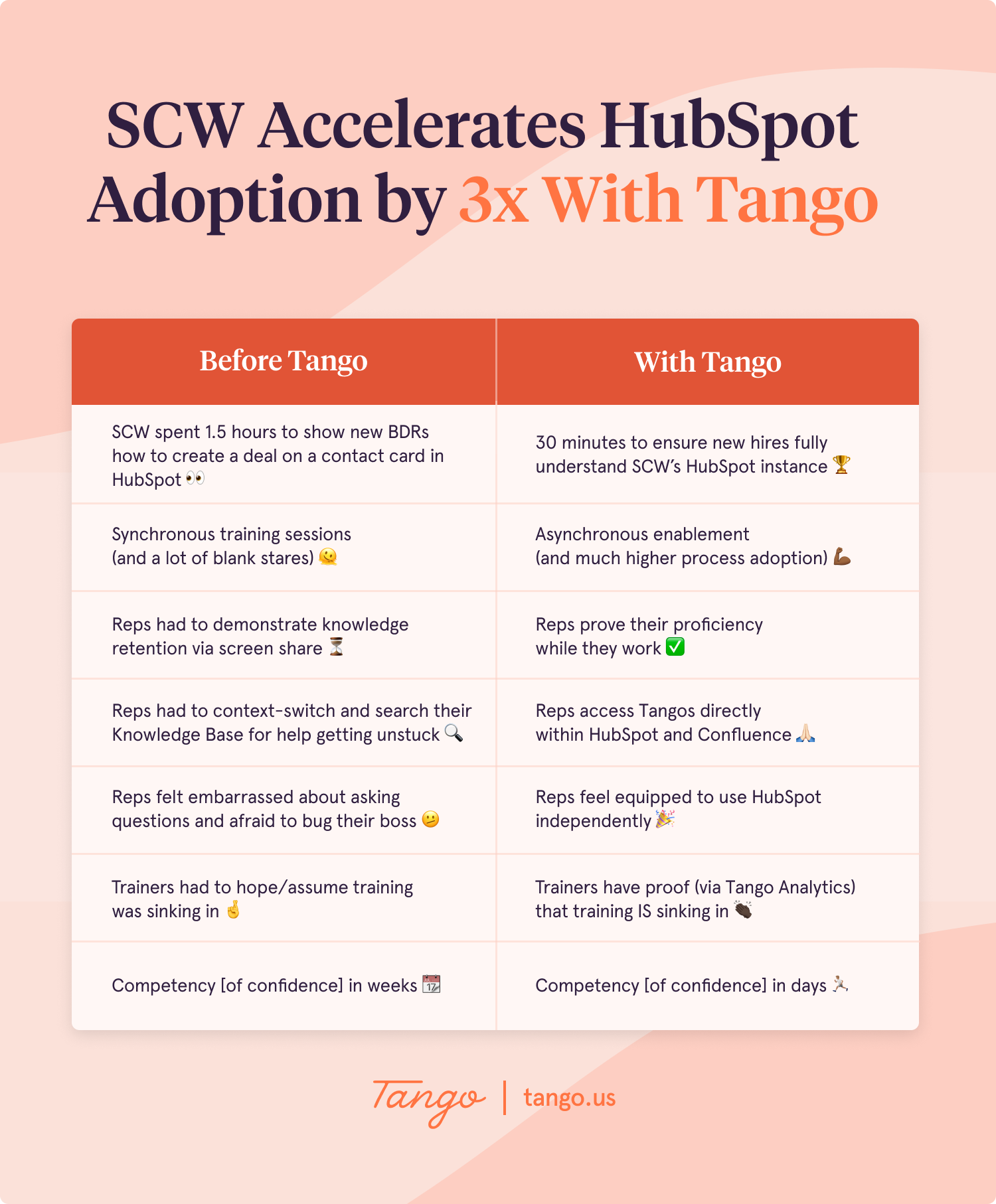
According to Tom, Tango Guidance is great for showing BDRs exactly what to do and where to click (in context in HubSpot)—but that’s just the beginning.
“As a trainer, I can give every BDR a HubSpot walkthrough they can use as many times as they need, without needing my help. As an end user, there’s no shame about going through a Tango five or six times.”
When sales reps aren’t worried about asking a stupid question or looking incompetent, they feel more sure of themselves.
“We live in HubSpot, so Tango is huge for increasing confidence across the board. My BDRs are empowered to get unstuck on their own, and I trust they’re adopting our processes correctly right out of the gate. Instead of blank stares, I get haptic feedback.”
To see who is/isn’t following standard operating procedures in HubSpot successfully, Tom leans on the analytics dashboard in Tango. Whenever a walkthrough doesn’t have a 100% completion rate, Tom knows which Tango he needs to revisit and improve. BDRs appreciate the continuous process improvement, and like Tango “because it lives inside of HubSpot, helps them get unstuck without switching tabs, and saves mental bandwidth.”
Tom’s own productivity has benefited, too:
“Tango saves me hours across every phase of training. I spend less time making how-to guides, delivering training, answering questions and re-training, figuring out if my training is working, and deciding what to optimize.”
TL;DR: RTE creates a virtuous feedback loop for Tom and the sellers he helps focus on selling.
| Tango Benefits for Tom | Tango Benefits for Tom’s BDRs |
|---|---|
| Fewer CRM-related FAQs | Customized HubSpot training |
| Accelerated HubSpot process adoption | More mental bandwidth for learning how to sell |
| Faster new hire time-to-ramp | More confidence, sooner |
| Increased productivity | More revenue, faster |
It takes two to Tango
In RevOps, failing to drive CRM adoption is failing to win. To operationalize HubSpot to fit your business's unique needs, you need Tango.
“HubSpot customers are actively exploring ways to simplify software adoption and enhance their processes. Tango's solution provides a real-time enablement and digital adoption product that becomes a force multiplier for customer-centric organizations,” said Brandon Greer, Head of HubSpot Ventures. “We’re thrilled to make this strategic investment and look forward to working with the Tango team to continue empowering our customers with innovative tools that support their growth and success.”
We couldn’t be more excited to team up with such a widely beloved brand.
“HubSpot sets the standard for building products that delight customers. We’re happy to help even the most change-resistant software users reap all the benefits of the leading customer platform for enterprise businesses.”
-Brian Shultz, Chief Technology Officer and Co-founder of Tango